Windows Administrator vs Linux Administrator – Introduction
If you’re planning a career in IT infrastructure, cloud computing, DevOps, cybersecurity, or technical freelancing, one question inevitably appears:
Should you learn Windows Administration or Linux Administration first?
This is one of the most important decisions for aspiring System Administrators because the skills you learn early often influence your career path, certifications, job opportunities, and earning potential.
The good news is that neither choice is wrong.
Both Windows and Linux power critical business infrastructure worldwide. Banks, hospitals, governments, cloud providers, startups, and multinational companies rely on one or both operating systems every day.
However, they serve different environments and lead to different career opportunities.
In this guide, you’ll learn:
- What Windows Administrators do
- What Linux Administrators do
- Key differences between both careers
- Salary comparisons
- Job demand trends
- Certification paths
- Freelancing opportunities
- Which one beginners should learn first
- How to transition into Cloud, DevOps, and Cybersecurity
By the end, you’ll know exactly where to start based on your career goals.
Table of Contents
- What Is a Windows Administrator?
- What Is a Linux Administrator?
- Windows Administrator vs Linux Administrator: Quick Answer
- Key Differences at a Glance
- Daily Responsibilities Compared
- Skills Required for Each Role
- Learning Curve Comparison
- Job Market Demand
- Salary Comparison
- Certification Paths
- Freelancing Opportunities
- Cloud and DevOps Relevance
- Cybersecurity Opportunities
- Pros and Cons of Each Career
- Which One Should Beginners Learn First?
- Best Learning Roadmaps
- Common Mistakes Beginners Make
- Expert Recommendations
- Final Verdict
- FAQs
Windows Administrator vs Linux Administrator: Which Should You Learn First?
For most beginners, Windows Administration is easier to learn first because of its graphical interface and widespread use in corporate environments. However, Linux Administration offers stronger opportunities in cloud computing, DevOps, cybersecurity, and high-paying infrastructure roles. The best approach is to start with Windows fundamentals and gradually learn Linux.
What Is a Windows Administrator?
A Windows Administrator manages Microsoft-based infrastructure.
They ensure servers, desktops, applications, and user accounts function properly.
Common responsibilities include:
- Managing Windows Server
- Active Directory administration
- Group Policy management
- User account administration
- DNS and DHCP management
- Microsoft Exchange support
- File and print services
- Backup and recovery
- Patch management
- Security monitoring
Think of a Windows Administrator as the caretaker of a company’s Microsoft ecosystem.
What Is a Linux Administrator?
A Linux Administrator manages Linux-based servers and infrastructure.
These professionals ensure Linux systems remain secure, stable, and highly available.
Common responsibilities include:
- Server deployment
- User management
- Package installation
- Shell scripting
- Performance tuning
- Security hardening
- Backup management
- Network configuration
- Web server administration
- Automation tasks
Linux Administrators frequently work with command-line tools rather than graphical interfaces.
Windows Administrator vs Linux Administrator: Quick Comparison
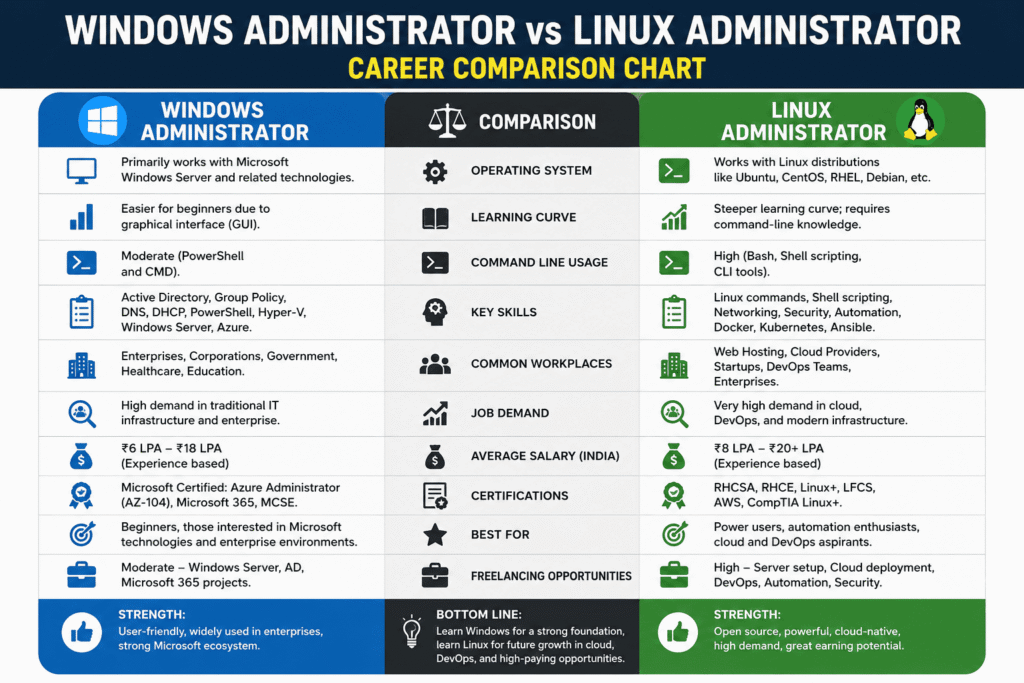
| Feature | Windows Administrator | Linux Administrator |
|---|---|---|
| Learning Difficulty | Easier | Moderate |
| GUI Availability | Extensive | Limited |
| Command Line Usage | Moderate | Heavy |
| Enterprise Usage | Very High | Very High |
| Cloud Usage | Medium | Extremely High |
| DevOps Compatibility | Moderate | Excellent |
| Automation | PowerShell | Bash, Python |
| Salary Potential | High | Higher |
| Freelancing | Moderate | High |
| Cybersecurity Relevance | High | Very High |
Daily Responsibilities Compared
Windows Administrator Daily Tasks
Typical day:
- Unlock user accounts
- Manage Active Directory
- Apply Windows updates
- Troubleshoot login issues
- Manage Group Policies
- Monitor server performance
- Configure backups
- Review security events
Tools commonly used:
- Active Directory
- Windows Server
- PowerShell
- SCCM
- Intune
- Hyper-V
- Azure
Linux Administrator Daily Tasks
Typical day:
- Check server health
- Review logs
- Manage services
- Apply security patches
- Configure backups
- Write automation scripts
- Manage web servers
- Troubleshoot performance issues
Tools commonly used:
- SSH
- Bash
- Vim
- Ansible
- Docker
- Kubernetes
- Jenkins
- Git
Learning Curve Comparison
Why Windows Is Easier for Beginners
Most people have already used Windows desktops.
This familiarity reduces the learning curve.
Advantages:
- Graphical interface
- Easier navigation
- Visual administration tools
- Extensive Microsoft documentation
- Less command-line dependency
Why Linux Feels Harder Initially
Linux introduces concepts unfamiliar to many beginners:
- Terminal commands
- File permissions
- Shell scripting
- Process management
- Package managers
The first few weeks can feel challenging.
However, once mastered, Linux administration becomes extremely powerful.
Skills Required
Windows Administrator Skills
Core Skills
- Windows Server
- Active Directory
- Group Policy
- DNS
- DHCP
- PowerShell
- Hyper-V
- Azure Administration
Advanced Skills
- Microsoft 365
- Exchange
- Intune
- Identity Management
- Azure AD
Linux Administrator Skills
Core Skills
- Linux commands
- User management
- Networking
- Shell scripting
- SSH
- Security hardening
Advanced Skills
- Docker
- Kubernetes
- Ansible
- Terraform
- AWS
- CI/CD
Job Market Demand
Windows Administrator Demand
Windows remains dominant in:
- Government organizations
- Healthcare
- Education
- Banking
- Enterprise environments
Many organizations still rely heavily on:
- Active Directory
- Windows Server
- Microsoft 365
Therefore Windows Administrators remain in strong demand.
Linux Administrator Demand
Linux dominates:
- Cloud platforms
- Web hosting
- SaaS companies
- DevOps teams
- Data centers
Most cloud workloads run Linux.
As cloud adoption grows, Linux demand continues increasing.
Salary Comparison
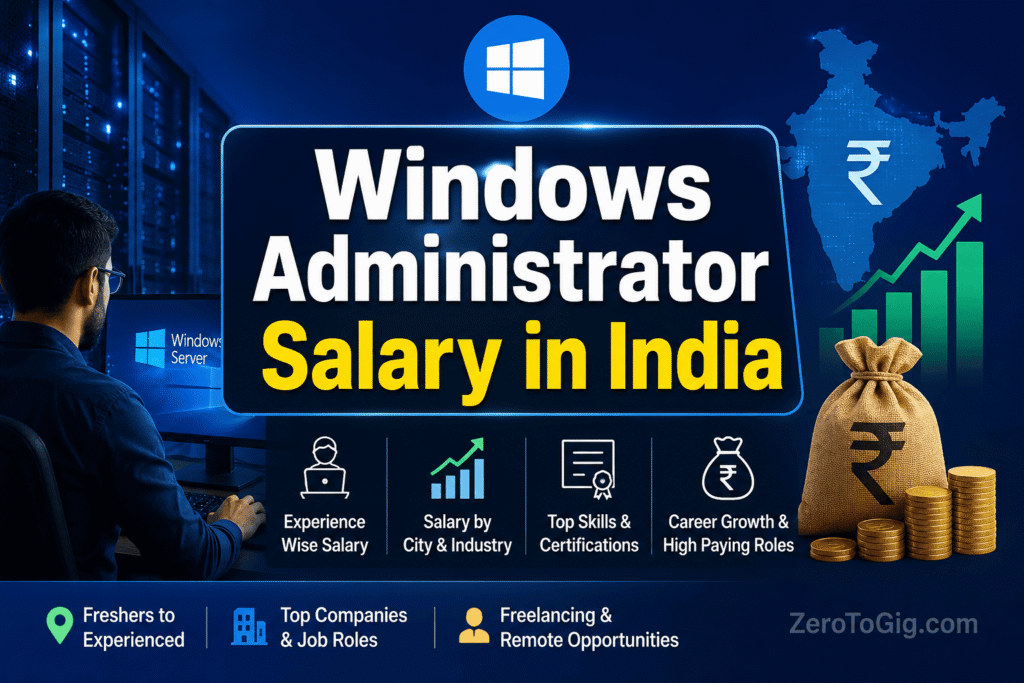
Windows Administrator Salary (India)
| Experience | Salary |
|---|---|
| Fresher | ₹3–6 LPA |
| 3 Years | ₹6–10 LPA |
| 5 Years | ₹10–18 LPA |
| 10 Years | ₹18–30+ LPA |
Linux Administrator Salary (India)
| Experience | Salary |
|---|---|
| Fresher | ₹4–7 LPA |
| 3 Years | ₹8–12 LPA |
| 5 Years | ₹12–20 LPA |
| 10 Years | ₹20–35+ LPA |
Linux often commands higher salaries because fewer professionals possess advanced Linux skills.
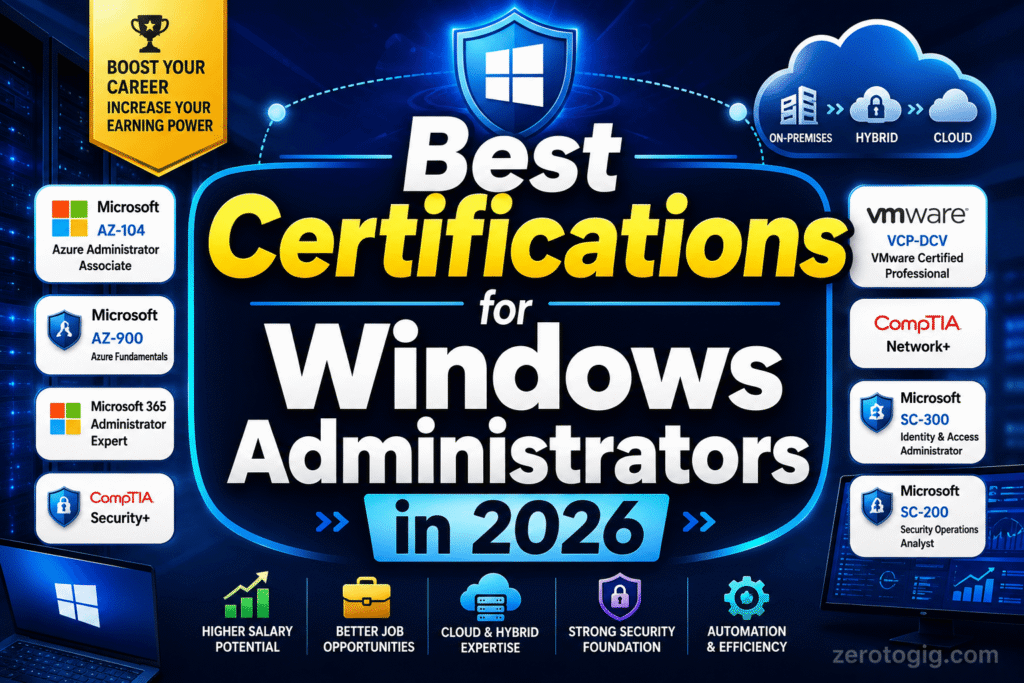
Certification Paths
Best Windows Certifications
Beginner
- Microsoft Fundamentals
- Azure Fundamentals (AZ-900)
Intermediate
- Azure Administrator (AZ-104)
Advanced
- Azure Solutions Architect
Best Linux Certifications
Beginner
- Linux Essentials
Intermediate
- RHCSA
- CompTIA Linux+
Advanced
- RHCE
- LFCS
- LFCE
Freelancing Opportunities
Linux typically offers more freelancing opportunities.
Common freelance services:
Linux Freelancers
- Server setup
- Cloud migration
- Docker deployment
- Security hardening
- Web hosting support
- Kubernetes administration
Typical rates:
₹1,500–₹10,000+ per hour depending on expertise.
Windows Freelancers
- Active Directory support
- Microsoft 365 migration
- Exchange administration
- Windows Server troubleshooting
- Intune deployments
Typical rates:
₹1,000–₹7,000+ per hour.
Cloud and DevOps Relevance
Windows in Cloud
Important for:
- Azure
- Active Directory
- Microsoft ecosystems
Linux in Cloud
Linux dominates:
- AWS
- Azure
- Google Cloud
- Kubernetes
- Docker
More than 80% of cloud workloads run Linux-based systems.
Because of this, Linux knowledge is considered almost mandatory for DevOps careers.
Cybersecurity Opportunities
Linux provides stronger foundations for:
- Ethical hacking
- Security operations
- Penetration testing
- Cloud security
- Security engineering
Many security tools run on Linux.
Examples:
- Kali Linux
- OpenVAS
- Metasploit
- Wireshark
- Security Onion
Pros and Cons
Windows Administrator
Advantages
✔ Easier to learn
✔ Large enterprise adoption
✔ Familiar environment
✔ Strong Microsoft ecosystem
✔ Excellent support resources
Disadvantages
✖ Licensing costs
✖ Less dominant in cloud
✖ Limited open-source ecosystem
Linux Administrator
Advantages
✔ High cloud demand
✔ Better DevOps alignment
✔ Strong automation capabilities
✔ Open-source ecosystem
✔ Higher earning potential
Disadvantages
✖ Steeper learning curve
✖ Command-line heavy
✖ Requires continuous learning
Common Beginner Mistakes
1. Learning Tools Instead of Fundamentals
Understand:
- Networking
- Operating Systems
- Security
- Storage
Before focusing on advanced tools.
2. Ignoring Scripting
Automation is critical.
Learn:
- PowerShell (Windows)
- Bash (Linux)
- Python (Both)
3. Avoiding Home Labs
Hands-on practice accelerates learning dramatically.
Build a lab using:
- VirtualBox
- VMware Workstation
- Hyper-V
4. Chasing Too Many Certifications
Focus on skills first.
Certifications should validate skills, not replace them.
Expert Recommendation
For most aspiring IT professionals:
Step 1
Learn Windows Administration fundamentals.
Step 2
Learn Networking.
Step 3
Learn Linux Administration.
Step 4
Learn Cloud Computing.
Step 5
Learn Automation.
Step 6
Move into DevOps, Cloud Engineering, or Cybersecurity.
This path creates maximum career flexibility.
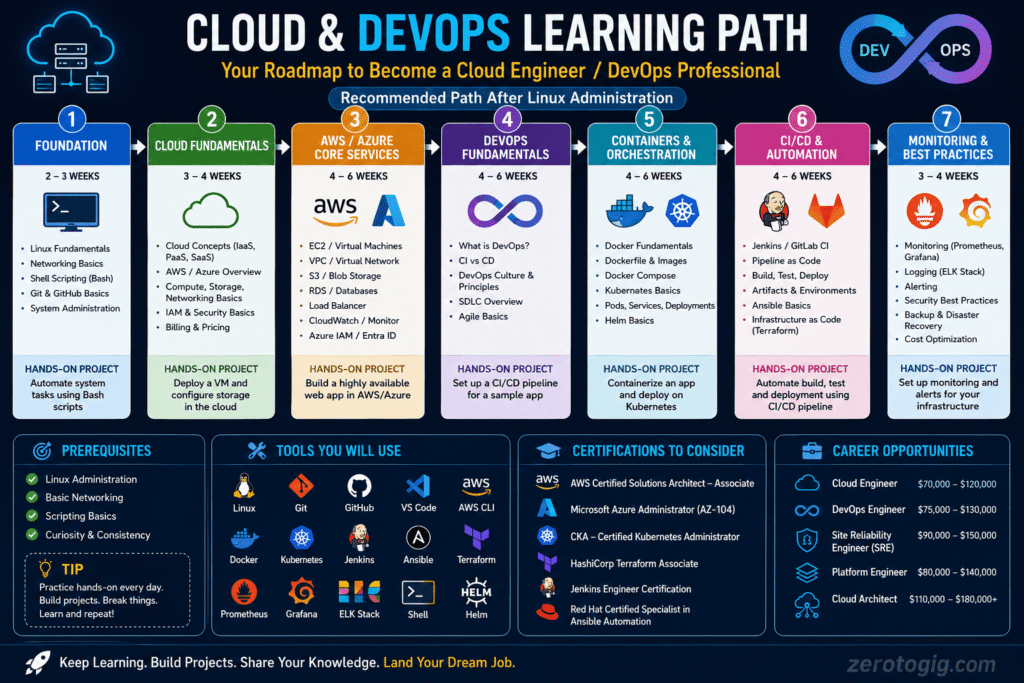
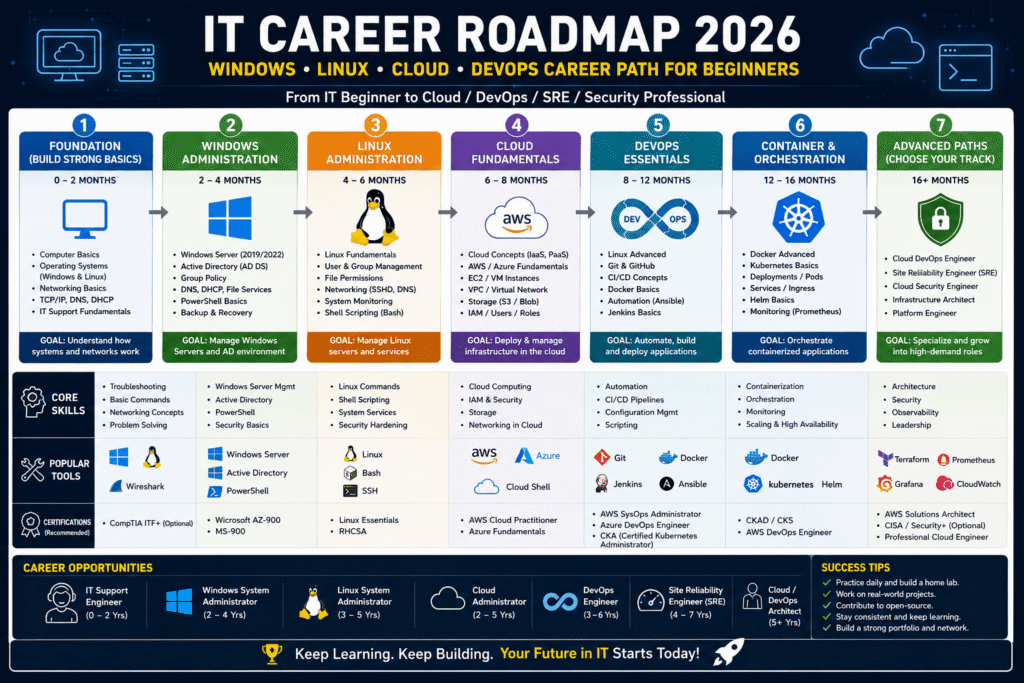
Best Roadmap for 2026
Months 1–3
- Windows Server
- Active Directory
- DNS
- DHCP
Months 4–6
- Linux Fundamentals
- Bash
- SSH
- System Administration
Months 7–9
- AWS or Azure
Months 10–12
- Docker
- Git
- Ansible
Months 13–18
- Kubernetes
- Terraform
- CI/CD
This roadmap aligns perfectly with modern infrastructure careers.
Final Verdict: Windows Administrator vs Linux Administrator
If your goal is to get your first IT infrastructure job quickly, start with Windows Administration.
If your long-term goal is Cloud Engineering, DevOps, Site Reliability Engineering, Cybersecurity, or high-paying freelance infrastructure work, Linux Administration should become a priority soon after.
The smartest strategy is not choosing one forever.
Learn Windows first for accessibility and enterprise exposure, then add Linux to unlock cloud, DevOps, and automation opportunities.
In today’s IT world, the professionals earning the highest salaries are often those who can confidently manage both environments.
Frequently Asked Questions
1. Is Linux harder than Windows Administration?
Yes. Linux has a steeper learning curve because it relies heavily on command-line tools, scripting, and system internals.
2. Can I get a job with only Windows Administration skills?
Yes. Many organizations still hire Windows Administrators for Active Directory, Microsoft 365, and Windows Server management.
3. Which pays more: Windows or Linux Administration?
Generally, Linux Administration pays more because Linux skills are highly valued in cloud and DevOps environments.
4. Do DevOps Engineers need Linux?
Yes. Most DevOps tools and cloud platforms operate primarily on Linux systems.
5. Should I learn PowerShell or Bash first?
Learn PowerShell if starting with Windows. Learn Bash if focusing on Linux.
6. Is Linux necessary for AWS?
While AWS supports Windows, most AWS workloads run on Linux. Linux knowledge provides a significant advantage.
7. Can I freelance as a System Administrator?
Absolutely. Many businesses hire freelancers for server setup, migrations, cloud deployments, security hardening, and troubleshooting.
8. Which certification should beginners start with?
For Windows: AZ-900.
For Linux: Linux Essentials or RHCSA.
Conclusion
Ready to build a successful IT infrastructure career?
Start by mastering Windows Administration fundamentals, then add Linux Administration skills to future-proof your career. If your goal is Cloud, DevOps, Cybersecurity, or Tech Freelancing, learning both platforms will give you a significant advantage in the job market.
Explore our complete career guides on ZeroToGig.com and begin building the skills that employers and clients are actively paying for today.