
If you’ve ever wondered who keeps office computers running smoothly, manages company servers, resets employee passwords, and ensures business systems stay online, the answer is usually a Windows Administrator.
A few years ago, many Indian IT professionals started their careers in helpdesk and technical support roles before moving into system administration. Even today, Windows Administration remains one of the most stable and beginner-friendly IT careers in India.
The best part? You don’t need to be a software developer or coding expert to get started.
Whether you’re a fresher, diploma holder, BCA/BSc student, engineering graduate, or someone looking to switch careers, learning how to become a Windows Administrator in India can open doors to thousands of IT infrastructure jobs.
In this guide, you’ll learn:
- What a Windows Administrator actually does
- Skills required in 2026
- Certifications that matter
- Step-by-step learning roadmap
- Salary expectations in India
- Best courses and learning platforms
- Common mistakes beginners make
🚀 Want to start learning immediately? Enroll in a beginner-friendly Windows Server course and begin building practical skills today.
Table of Contents
- What is a Windows Administrator?
- Why Becoming a Windows Administrator is a Smart Career Choice in 2026
- Skills Required Before You Start
- Tools and Equipment You Need
- Step-by-Step Guide to Become a Windows Administrator
- Best Learning Platforms and Courses
- Common Mistakes Beginners Make
- Windows Administrator: Pros and Cons
- Who Should Choose This Career?
- Windows Administrator Salary in India
- Expert Tips to Get a Job Faster
- Frequently Asked Questions
- Final Verdict

What is a Windows Administrator?
A Windows Administrator (also called a Windows System Administrator) is an IT professional responsible for installing, configuring, maintaining, and securing Microsoft Windows servers and computer networks.
Think of a Windows Administrator as the caretaker of a company’s digital infrastructure.
Just like a building manager ensures electricity, water, and security systems work properly, a Windows Administrator ensures servers, user accounts, networks, and business applications function without interruption.
Typical responsibilities include:
- Managing Windows Servers
- Active Directory administration
- User account management
- Group Policy configuration
- System monitoring
- Security updates and patching
- Backup and disaster recovery
- Troubleshooting server issues
Companies of all sizes hire Windows Administrators, from startups in Bengaluru to multinational corporations in Hyderabad, Pune, Chennai, Gurgaon, and Mumbai.
Windows Administrator vs Regular IT Support
| Feature | IT Support | Windows Administrator |
|---|---|---|
| Scope | User issues | Infrastructure management |
| Systems | PCs & laptops | Servers & networks |
| Salary | Lower | Higher |
| Responsibility | Reactive | Proactive |
| Career Growth | Limited | Strong |
A support engineer fixes a user’s printer.
A Windows Administrator ensures 500 employees can log in to company systems every day.
That’s a much bigger responsibility.
Why Becoming a Windows Administrator is a Smart Career Choice in 2026
Growing Demand for Infrastructure Professionals
Despite cloud computing growth, businesses still rely heavily on Windows environments.
Banks, hospitals, educational institutions, government departments, manufacturing companies, and IT firms continue using:
- Windows Server
- Active Directory
- Microsoft 365
- Azure Hybrid Infrastructure
As organizations expand digitally, skilled Windows Administrators remain essential.
Strong Salary Growth
Unlike some entry-level jobs that plateau quickly, Windows Administration offers multiple growth paths:
- System Administrator
- Senior System Administrator
- Infrastructure Engineer
- Windows Engineer
- Cloud Administrator
- Azure Administrator
- IT Manager
This means your earning potential increases significantly with experience.
Gateway to Cloud Careers
Learning Windows Administration is like learning to drive before becoming a professional racer.
Many Azure and cloud engineers started with Windows Server administration.
Once you master: How to Become a Windows Administrator in India
- Active Directory
- DNS
- DHCP
- Networking
- Windows Server
Transitioning into Azure becomes much easier.
What You Need Before You Start
Skills You Need
Good news.
You do NOT need advanced programming skills.
However, you should develop:
Technical Skills
- Windows Operating Systems
- Windows Server
- Networking Basics
- Active Directory
- DNS
- DHCP
- PowerShell
- Microsoft 365
- Troubleshooting
Soft Skills
- Communication
- Documentation
- Problem-solving
- Patience
- Analytical thinking
A Windows Administrator spends as much time solving problems as configuring servers.
Skills You Don’t Need Initially
Many beginners worry about: How to Become a Windows Administrator in India
- Java
- Python
- C++
- Data Structures
- Machine Learning
These are not mandatory for entry-level Windows Administration roles.
PowerShell scripting becomes useful later, but you can start without being a coding expert.
Tools and Equipment You Need
To practice effectively, you need: How to Become a Windows Administrator in India
Laptop or Desktop
Recommended:
- Intel i5/Ryzen 5
- 16GB RAM
- 512GB SSD
Virtualization Software
- VMware Workstation
- VirtualBox
- Hyper-V
Windows Server Evaluation Copies
Microsoft provides trial versions for learning purposes.
Internet Connection
A stable broadband connection is sufficient.
Note-Taking Tool
Document every lab and configuration exercise.
Good administrators keep excellent documentation.
Step-by-Step Guide: How to Become a Windows Administrator in India
Step 1: Learn Computer Fundamentals
Before touching servers, understand:
- Operating systems
- Hardware basics
- Storage concepts
- User management
Tip: Build a strong foundation before moving into advanced topics.
Step 2: Master Windows Operating Systems
Learn: How to Become a Windows Administrator in India
- Windows 10
- Windows 11
- User profiles
- Registry basics
- System troubleshooting
Most enterprise environments still require deep Windows knowledge.
Tip: Practice solving common Windows problems regularly.
Step 3: Learn Networking Fundamentals
Networking is the backbone of system administration.
Study:
- IP Addressing
- DNS
- DHCP
- Subnetting
- VPN
- Firewalls
Imagine servers as houses and networking as roads connecting them.
Without roads, no one can reach the houses.
Tip: Networking knowledge separates average administrators from excellent ones.
Step 4: Install Windows Server
Download and install Windows Server in a virtual machine.
Learn: How to Become a Windows Administrator in India
- Installation
- Configuration
- Server Manager
- Roles and Features
Hands-on practice is critical.
Reading alone won’t make you job-ready.
Tip: Create multiple virtual servers for experimentation.
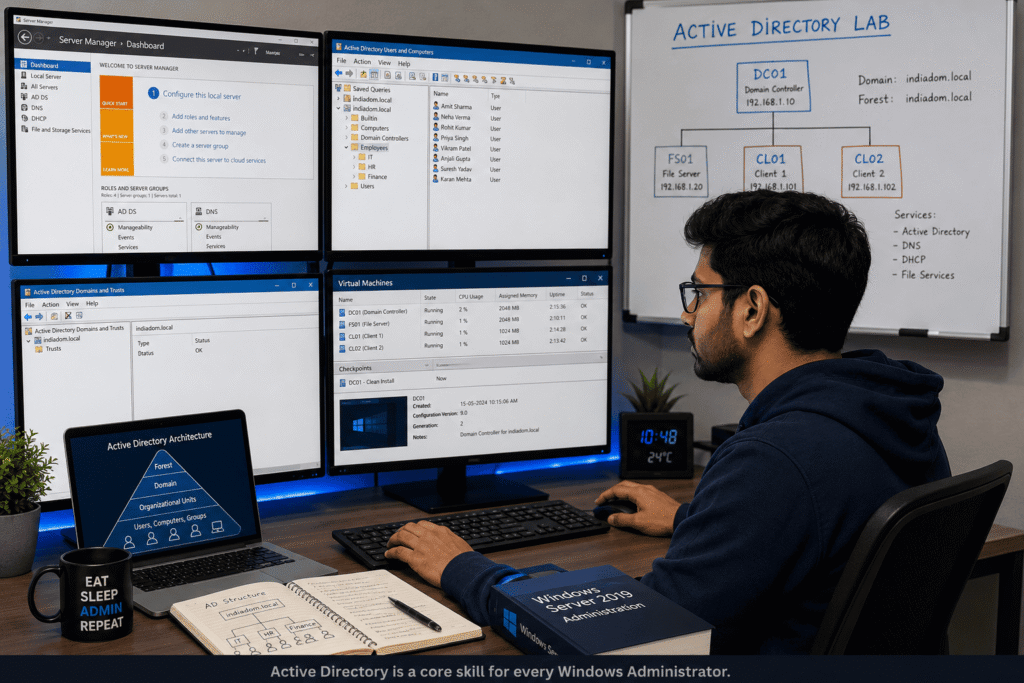
Step 5: Learn Active Directory
Active Directory is one of the most important skills.
Focus on: How to Become a Windows Administrator in India
- Domains
- Organizational Units
- Users
- Groups
- Permissions
Think of Active Directory as a school’s attendance register.
It keeps track of who belongs where and what they can access.
Tip: Spend extra time mastering AD concepts.
Step 6: Learn Group Policy
Group Policy helps administrators control thousands of computers centrally.
Examples: How to Become a Windows Administrator in India
- Password policies
- Desktop restrictions
- Security settings
This is one of the most powerful tools in Windows environments.
Tip: Practice creating and linking GPOs regularly.
Step 7: Learn PowerShell Basics
PowerShell automates repetitive tasks.
Start with: How to Become a Windows Administrator in India
- Commands
- Variables
- Scripts
- Remote management
Even basic PowerShell knowledge can make you more employable.
Tip: Automate one small task every week.
Step 8: Understand Backup and Recovery
Every administrator must know: How to Become a Windows Administrator in India
- Backup strategies
- Restore procedures
- Disaster recovery
Companies value professionals who can recover systems during emergencies.
Tip: Practice restoring backups, not just creating them.
Step 9: Earn Industry Certifications
Recommended certifications:
Microsoft Certified: Azure Fundamentals (AZ-900)
Great starting point.
Microsoft Certified: Azure Administrator (AZ-104)
Highly valued in enterprise environments.
CompTIA Network+
Excellent networking foundation.
CompTIA Server+
Useful for server administration concepts.
Tip: Certification plus practical labs creates the strongest profile.
Step 10: Build Projects and Apply for Jobs
Create a home lab and showcase:
- Domain Controller setup
- Active Directory management
- DNS configuration
- Group Policies
- Backup systems
Recruiters love practical experience.
Tip: Document your projects on LinkedIn and GitHub.
Best Platforms to Learn Windows Administration in 2026
Affiliate Disclaimer: This post contains affiliate links. If you sign up through our link, we may earn a commission at no extra cost to you.
Udemy
Best for beginners.
Popular topics: How to Become a Windows Administrator in India
- Windows Server Administration
- Active Directory
- PowerShell
Coursera
Best for structured learning.
Offers certificates from top institutions.
LinkedIn Learning
Great for professionals seeking short courses.
Microsoft Learn
Best free resource.
Directly maintained by Microsoft.
Pluralsight
Excellent for infrastructure and cloud training.
Ready to build job-ready skills?
Choose one course platform and commit to learning for 60 days consistently. Small daily progress beats weekend cramming every time.

Common Mistakes Beginners Make
- Learning theory without practice
- Ignoring networking concepts
- Avoiding PowerShell completely
- Chasing too many certifications
- Not building a home lab
- Skipping Active Directory
- Applying for jobs without projects
- Neglecting LinkedIn networking
The biggest mistake?
Trying to learn everything at once.
Focus on one skill at a time.
Windows Administrator: Pros and Cons
| Pros | Cons |
| Stable career | On-call support possible |
| Good salary growth | Occasional night shifts |
| High demand | Requires continuous learning |
| Path to cloud careers | Responsibility during outages |
| Beginner friendly | Infrastructure issues can be stressful |
Every career has trade-offs.
The key is choosing one whose challenges you don’t mind handling.
Who Should Choose This Career?
This Career is Perfect for You If:
- You enjoy troubleshooting
- You like technology but not heavy coding
- You want a stable IT career
- You enjoy solving real-world problems
- You want to move into cloud computing later
This Career May Not Be Ideal If:
- You dislike technical troubleshooting
- You prefer creative work
- You want a coding-only role
- You avoid learning new technologies
Real Salary Examples for Windows Administrators in India
| Experience Level | Monthly Salary | Annual Salary |
| Fresher | ₹20,000–₹35,000 | ₹2.5–4.5 LPA |
| 1–3 Years | ₹35,000–₹60,000 | ₹4–8 LPA |
| 3–5 Years | ₹60,000–₹1,00,000 | ₹8–12 LPA |
| 5–8 Years | ₹1,00,000–₹1,50,000 | ₹12–18 LPA |
| Senior/Admin Lead | ₹1,50,000+ | ₹18–30+ LPA |
Salaries vary based on: How to Become a Windows Administrator in India
- Location
- Certifications
- Company size
- Cloud skills
- Experience
Professionals with Azure expertise generally command higher salaries.
Expert Tips to Get a Windows Administrator Job Faster
1. Build a Home Lab
Practical experience matters more than theory.
2. Learn Active Directory Deeply
This skill appears in most job descriptions.
3. Understand Networking
Networking knowledge boosts interview performance.
4. Learn Basic PowerShell
Automation skills help you stand out.
5. Earn AZ-900 Certification
A valuable beginner credential.
6. Optimize Your LinkedIn Profile
Recruiters actively search for infrastructure talent.
7. Apply Consistently
Treat job applications like a daily task.

Frequently Asked Questions
Can I become a Windows Administrator without coding?
Yes. Most entry-level roles focus on Windows Server, Active Directory, networking, and troubleshooting rather than programming.
Is Windows Administration a good career in India?
Yes. Many Indian organizations still rely heavily on Windows infrastructure, creating steady demand for skilled administrators.
Which certification is best for beginners?
AZ-900 (Azure Fundamentals) is an excellent starting certification.
How long does it take to become a Windows Administrator?
With consistent study and hands-on practice, many learners become job-ready within 6–12 months.
What is the salary of a Windows Administrator in India?
Freshers typically earn between ₹2.5–4.5 LPA, while experienced professionals can earn ₹12–30+ LPA.
Is Windows Administration being replaced by cloud computing?
No. Cloud computing actually increases demand for professionals who understand Windows infrastructure and hybrid environments.
Can diploma students become Windows Administrators?
Yes. Skills, certifications, and practical experience often matter more than degree type.
Which city offers the best opportunities?
Bengaluru, Hyderabad, Pune, Chennai, Gurgaon, Noida, and Mumbai offer strong opportunities for infrastructure professionals.
Final Verdict: Is Becoming a Windows Administrator Worth It?
Yes—especially if you want a stable IT career without becoming a full-time software developer.
Windows Administration remains one of the most practical entry points into enterprise IT. It teaches infrastructure, networking, security, troubleshooting, and cloud fundamentals that remain valuable across industries.
If you’re willing to spend a few months building hands-on skills and earning relevant certifications, you can position yourself for a rewarding career with strong long-term growth potential.
🚀 Ready to Start? How to Become a Windows Administrator in India
Join a Windows Server course today and begin building your first home lab.